


4 Essential Elements of a Successful Online Approval System
Share


AI may be making all the headlines these days, but the fact remains that human beings still have a lot of decisions to make in today’s business environment. And with business moving faster and faster every year as more technological tools are incorporated, streamlined human decision-making is more essential than ever for keeping projects on track and teams aligned. Approval systems serve as the backbone of this efficiency—establishing accountability, reducing bottlenecks, and ensuring compliance. But not all approval systems are built equally. To truly support your organization’s goals, an approval system should be not only efficient but also tailored to fit your team’s unique workflows and the broader goals of your business.
Today’s project management platforms handle much of this work, but if you already have a site that manages some or all of the data that is key to achieving approval, or are building one from scratch, you’ll benefit by understanding and implementing our four essential elements. Doing so will keep all users, data, workflows, and outputs in one secure, flexible platform, reducing duplication, friction, and vendor lock-in.
With our experience at Kalamuna, we’ve helped organizations build robust, customized Drupal workflows that empower teams, drive transparency, and maintain quality control. I’ve built several approval systems in Drupal over the years, gaining valuable, hard-earned insights into why they are a great choice for mission-driven organizations, although the four elements I propose here work with whatever system you use.
I’m excited to share what I’ve learned about the key elements of a successful approval system with you so you can build efficient, transparent workflows that keep your team aligned and your projects moving forward.
Why approval systems matter
Approval systems are essential for effective organizational decision-making, providing structure, accountability, and efficiency. Whether it’s content publication, project management, or operational workflows, key decisions need standardized checks and balances to ensure quality, accuracy, and compliance. An approval system formalizes the entire process, from what details are required, to approval steps, acknowledgements, and record-keeping, making them transparent and consistent across the organization.
Key benefits of an approval system
- Accountability: Approval systems establish clear ownership of tasks, ensuring everyone knows who is responsible for the next step. This reduces confusion and finger-pointing when issues arise.
- Quality Control: By setting predefined approval steps, organizations maintain consistent quality standards. Whether it's editorial oversight or executive sign-off, the process ensures every decision meets the required standards before moving forward.
- Efficiency: Although added approval steps might seem like they would slow things down, a well-designed system actually speeds things up. Automated notifications, reminders, and dashboards reduce bottlenecks and keep things moving without unnecessary delays.
- Compliance: Many industries require strict adherence to regulations and internal policies. Approval systems ensure all steps are followed and documented, making compliance easier. A detailed approval log also provides a clear audit trail.
- Transparency: With visibility into who made decisions and why, approval systems create transparency, which builds trust and allows managers to monitor workflows, preventing potential issues before they arise.
In short, approval systems bring order to otherwise chaotic processes, ensuring that organizations maintain compliance, streamline processes, and provide transparency throughout the decision-making journey. When integrated into a powerful platform like Drupal, these systems become even more effective, empowering teams to streamline their operations while maintaining clarity and control. So what are the essential elements of a successful system?
1. Keep everyone informed
Keeping everyone informed is vital to ensuring smooth operations and preventing bottlenecks in any approval system. When team members or decision-makers are not informed, the approval process can stall, leading to frustration and delays. A well-designed approval system relies on instant, clear communication to keep things moving. The following tools are essential for keeping everyone up to date:
On-screen notifications
When users take an action, they should receive immediate feedback to understand what their input triggered and who has been notified. In the example below, a funding manager has just approved use of their budget to pay for a team member’s business trip. Next, their supervisor will need to approve their attendance. Clear On-screen notifications help users quickly adapt to the system, showing them who is responsible for the next steps and ensuring they trust that the system has communicated on their behalf, removing the need to follow up manually. Here we can see that the funding manager knows who has been notified of their action and why. They can also tell that, as a result of their action, the request is now in Final Approval.

Off-site notifications
Users aren’t always on the platform, so off-site notifications (via email, messaging, etc.) are crucial for keeping approvals moving. These notifications alert users when action is needed or when the status of their request changes, even when they’re away from the site. These notifications should let the user know if action is required, and provide actionable links to guide them to perform the needed action.
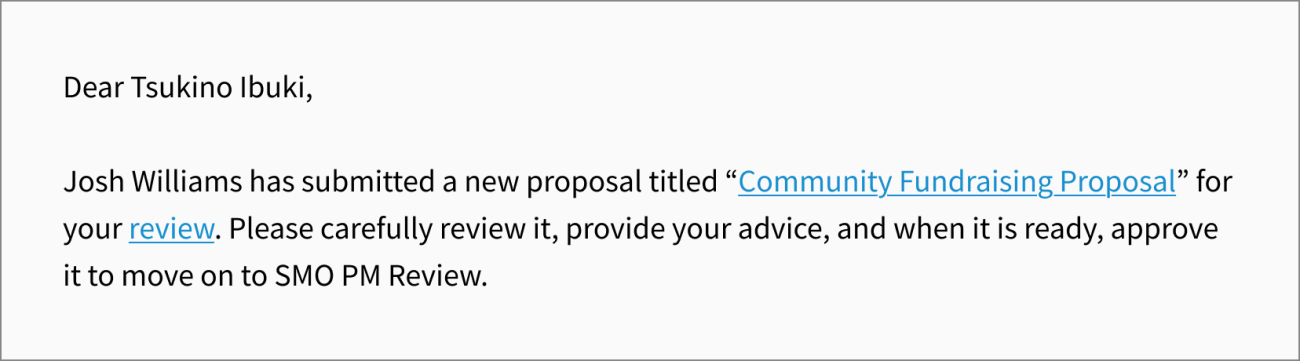
An email notification to a research unit leader that one of their staff has submitted a fundraising proposal for them to review before it is submitted to the funding agency. It has a clear call to action and a link to a page where the action can be taken.
Reminders
Approvals can get stuck if requests go unnoticed. Reminders are essential to keeping the process on track. They can often be implemented by reusing the original off-site notification template, with an added note explaining why the recipient is being reminded. This approach helps ensure tasks aren’t forgotten, prevents approvals from stalling, and minimizes the need for additional messaging templates.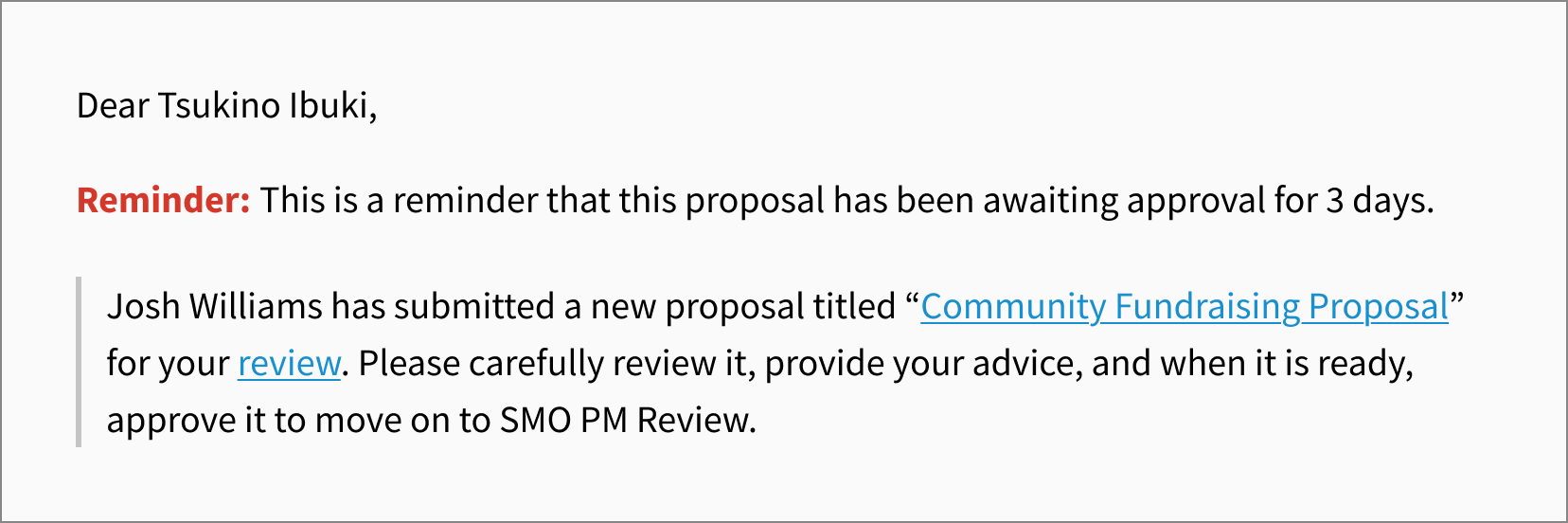
A reminder to the Research Unit Leader that a proposal is still awaiting their review. The email comes from the same template, but with a message added to let them know why they are receiving the message again.
Approval logs
Approval logs are essential for tracking the full lifecycle of a request. These logs provide a detailed record of every action taken, including timestamps, the person responsible, the action performed, and its impact on the request. By capturing every step in the process, approval logs ensure transparency and accountability, making it easy to audit and trace decisions throughout the entire workflow. This detailed history is crucial for maintaining a clear, verifiable trail of actions taken on a request.
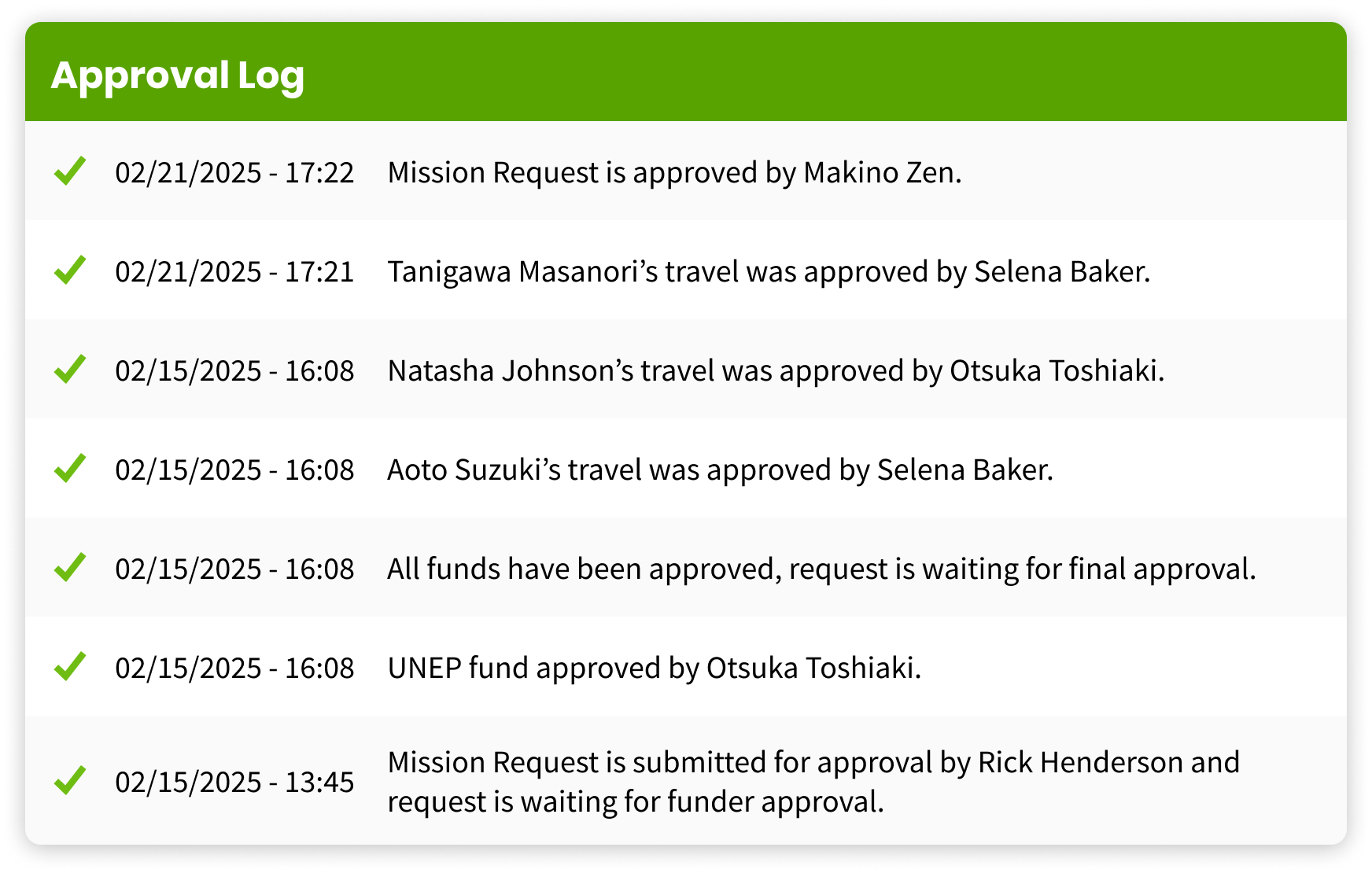
An approval log for a non-profit’s “Mission Request System”, a business travel approval system that enables the organization to keep track of hundreds of business trips per year. Every step in the approval process is logged as it happens with a timestamp, the name of the person who took the action, and the impact of that action on the request.
Timeline interface
A useful addition that provides a visual overview of the approval process is a timeline interface. It shows users which steps have been completed, the current state of the request, and what steps are coming up; all in an easy-to-follow format. It enhances the user experience by offering a clear, intuitive way to track progress at a glance, helping users stay informed about the workflow without diving into the details of the approval logs.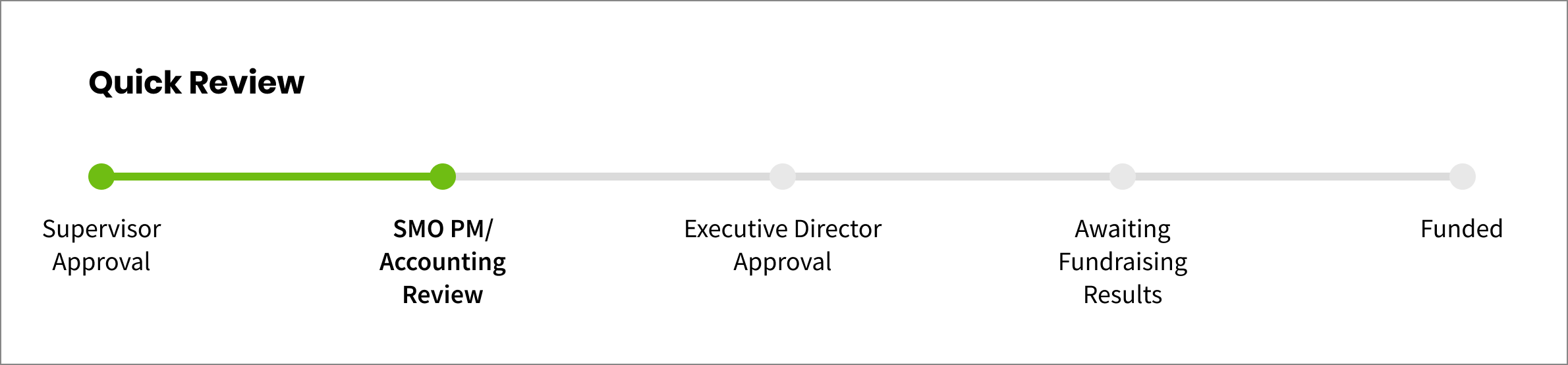
For linear workflows, a timeline interface can very quickly give users an overall sense of the entire workflow.
2. Keep things moving
Minimizing friction in the approval process is essential to maintain momentum. By providing users with clear, actionable opportunities, you can keep tasks progressing smoothly. The following tools help ensure that team members can take the necessary actions without delay:
- Actions dashboard: A centralized dashboard displaying all pending tasks helps users keep track of tasks awaiting their intervention. Whether it’s approving requests or providing feedback, this tool ensures no steps are missed and streamlines the approval process by allowing users to see exactly what requires their attention in one place.
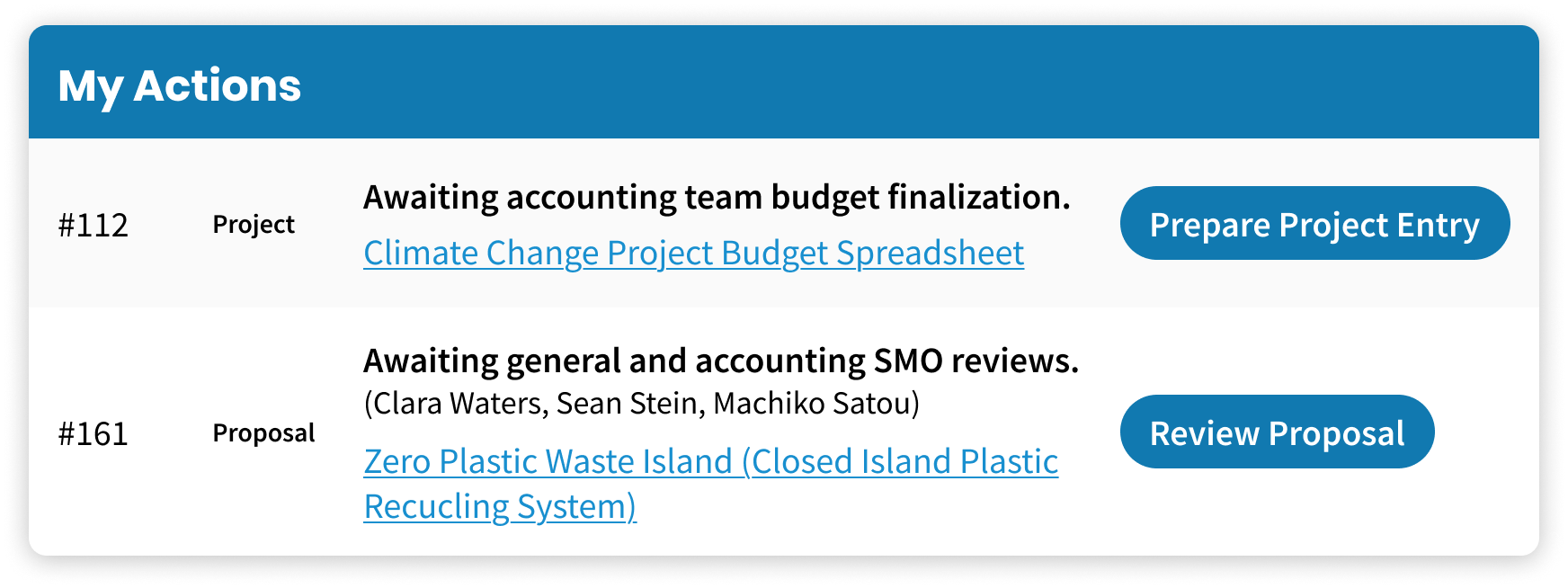
An example of an Actions dashboard from a climate change think tank non-profit’s intranet. The current staff is a member of the accounting team and has a project to finalize details for, and a proposal to review from a budgetary standpoint.
- Action buttons: Placing action buttons directly on actionable requests in lists makes it easier for users to take the next steps. By providing action opportunities wherever an actionable request appears, you ensure the process remains clear and accessible, reducing confusion and accelerating approvals.
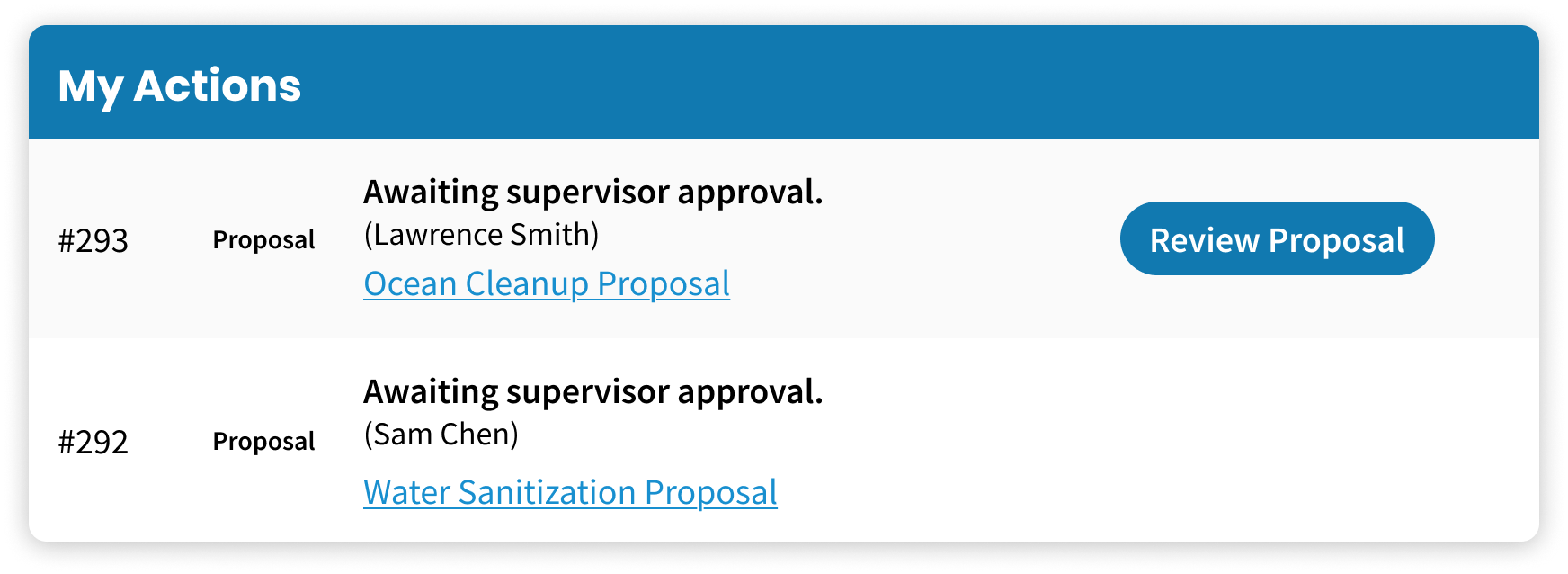
This list of recent proposals includes one awaiting review from the currently logged-in user. Whenever a request with actions available is displayed, action buttons are there, guiding the user to where those actions can be performed.
- Reminders: To prevent projects from stalling, reminders notify approvers when action is required. These updates keep tasks on track by ensuring users are aware of overdue tasks.
3. Make the right thing obvious
When workflows become complex, the user interface should simplify operations. Here are some tools and strategies that can help:
- Workflow buttons: The Workflow Buttons module for Drupal enhances a sometimes confusing content moderation interface by replacing state selection dropdowns with an action button for each available transition. Users can simply click a button corresponding to the action they need to take, without the need to select from a dropdown menu and hit save. When transitions are named after actions that are clear and intuitive to users, Workflow Buttons streamlines the experience, reducing confusion and making it easier to manage approvals. As a co-maintainer of the module, I’m excited about key improvements in the pipeline to make it even better.
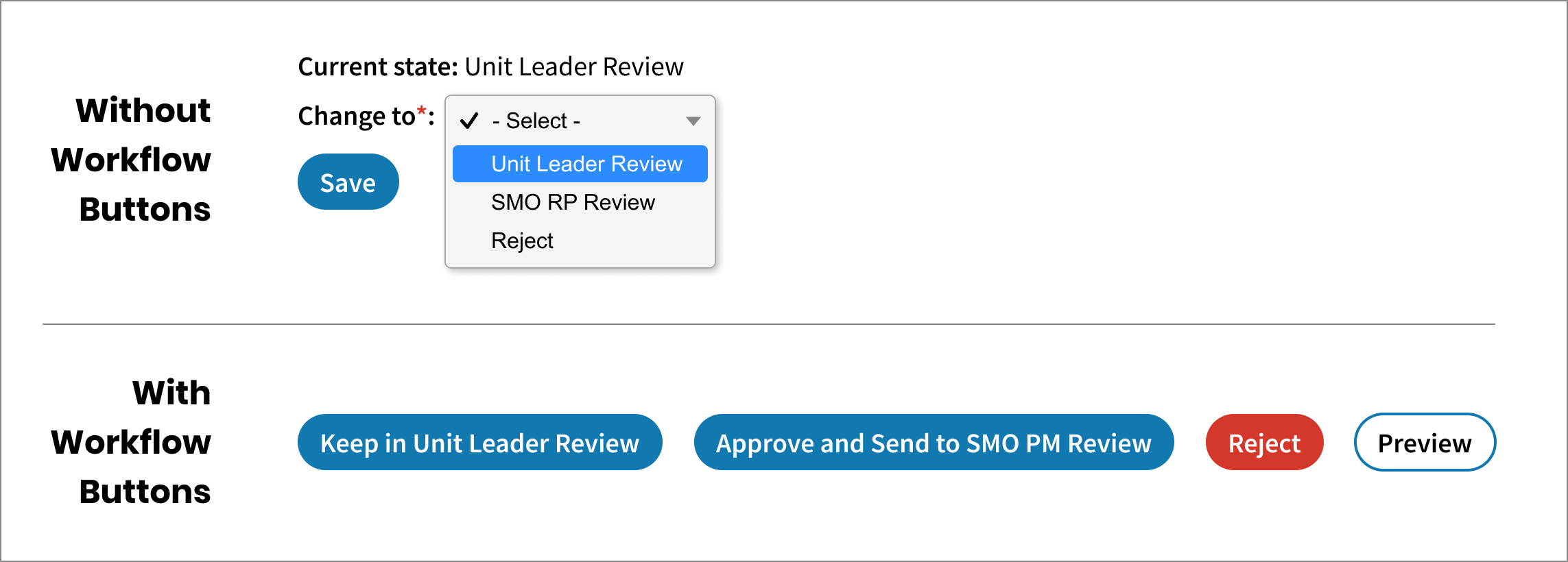
Workflow buttons provide a much more intuitive interface for moving a request from one state to another. Button labels come from transition names, not state names, allowing for an action-driven, intuitive user experience.
- Checklists: In some workflows, a step may require edits to specific parts of a request, but users still need access to the entire form for context. In these cases, adding a simple checklist at the bottom of the form can be highly effective. It helps users focus on the specific tasks they need to complete, providing clear guidance while still allowing them to view the full request.
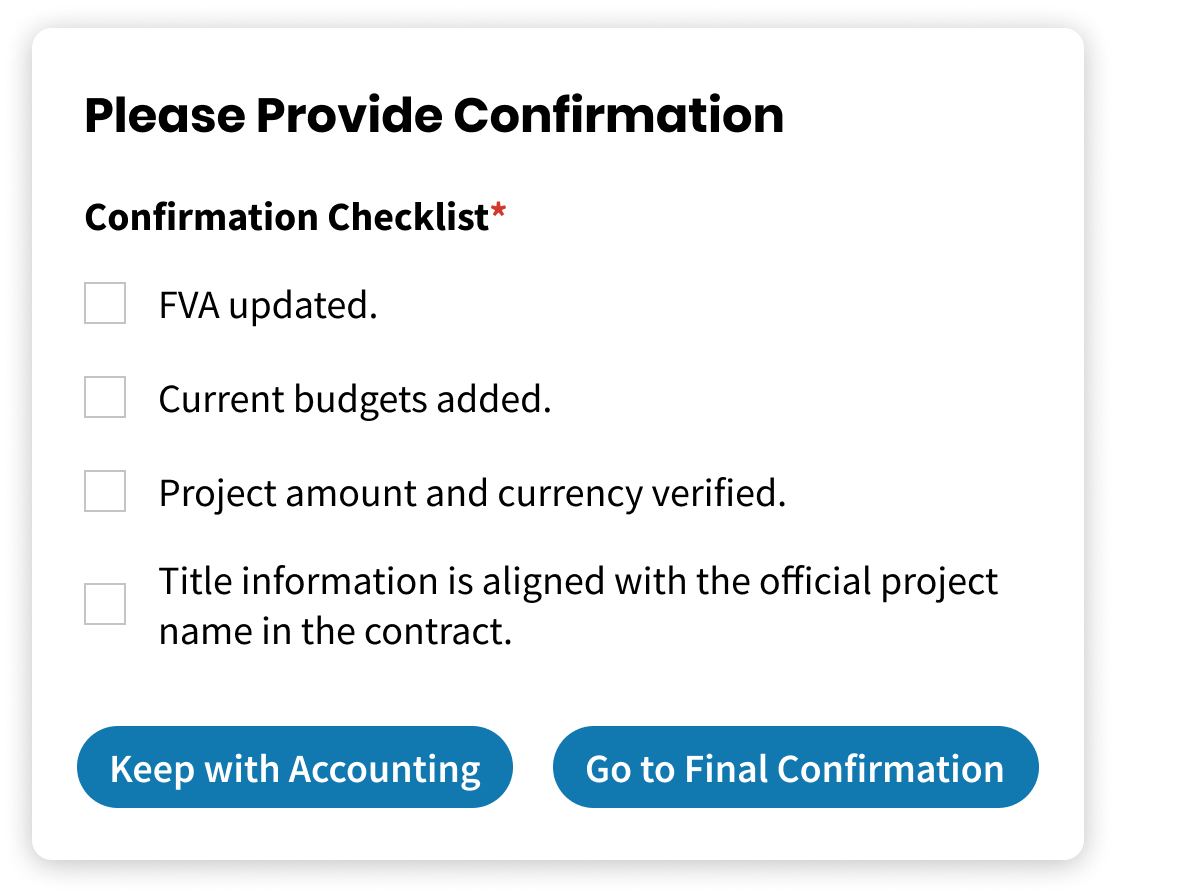
The accounting staff member is asked to edit four specific items in a much longer project form. This checklist helps guide them to do the right thing.
- Sometimes you will need to gather additional information from your approvers without presenting the entire form to edit the request they are deliberating about. It is important that this interface is unobtrusive, but there when it is needed. Sometimes this additional data may be required, sometimes optional. The best interface for this will depend on the case, but here are a few that have been effective for us.
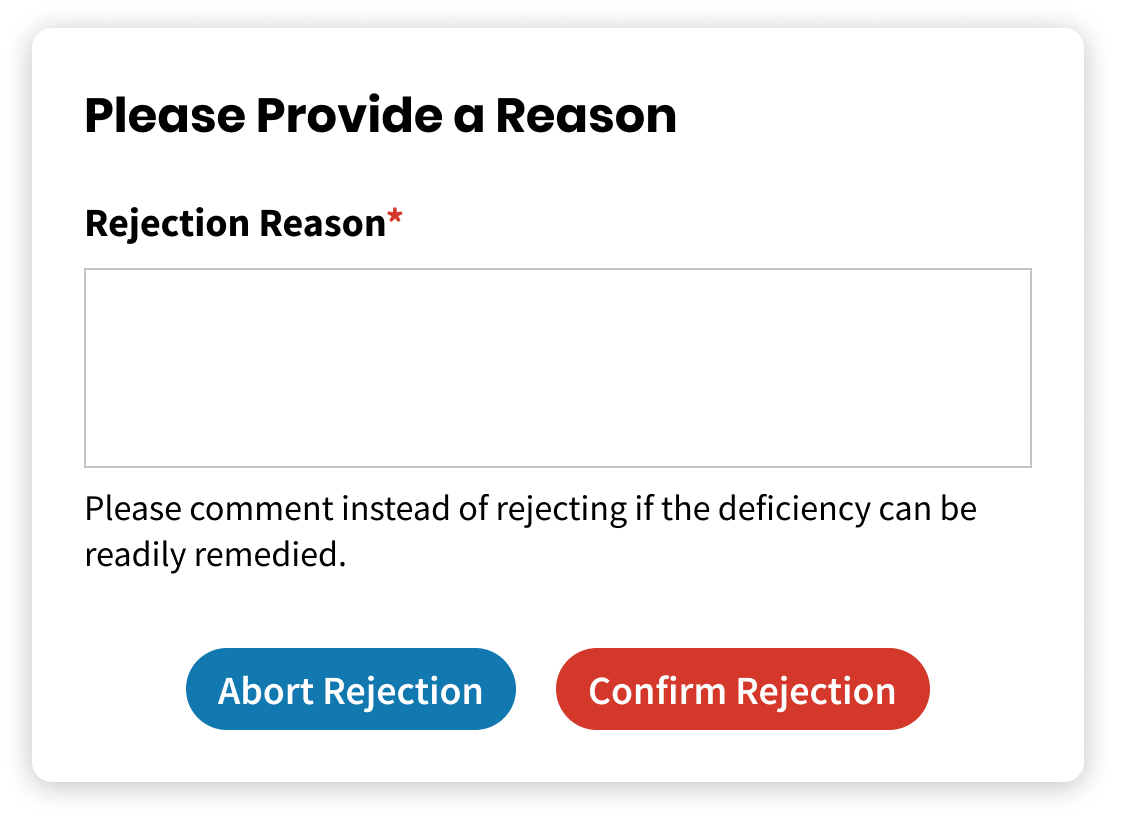
A modal requesting a required reason for rejection. The modal is triggered only when the reject button is clicked.
4. Measure your success
To justify the time and resources spent building and maintaining an approval system, it’s crucial to demonstrate its value through data and reporting. Tracking key performance metrics–such as approval times, bottlenecks, and overall system efficiency–allows organizations to measure the effectiveness of their approval workflows.
Planning ahead is essential. You need to determine what metrics will be most valuable, who will use the data, and how it should be presented. Consider whether metrics need to be filtered by criteria like date or user type to ensure they are accessible and actionable for the people relying on them.
By leveraging Drupal’s robust tools, organizations can not only create efficient approval systems but also back up their value with data-driven insights. A comprehensive approach to reporting and evaluation enables organizations to demonstrate the impact of their systems, justify the investment, and continuously leverage user feedback to refine your workflows for even greater efficiency and transparency.
We can help
At Kalamuna, we do more than design beautiful websites—we build systems and products that drive efficiency and productivity. As Drupal experts, we’re well-versed in developing tailored approval workflows that meet your organization’s unique needs.
Whether you’re starting from scratch or optimizing an existing system, we can help you create seamless approval processes that enhance decision-making and streamline operations. Contact us today to learn how we can help you maximize the potential of your web ecosystem.

Bob McDonald
If you need expertise in open source, especially Drupal, Bob is the person you want on your team. Not only is he equipped to handle any open source projects, but he is also passionate about making a positive difference in the world. Before joining Kalamuna, Bob worked in Japan for over ten years building technical solutions for international institutions and organizations. Beyond all things coding and developmental architecture, he is a dedicated woodworker and 3D printing enthusiast. Recently, Bob moved across the world from Japan to Canada; we are lucky to have him.