Your Higher-Ed Content Team Doesn’t Hate WordPress, It Hates Your WordPress Theme
Share


Let me be blunt. If your content editors think WordPress is slow, clunky, and confusing, they're not wrong about their experience, but they're placing the blame on the wrong culprit. The daily frustration you might hear them talk about—the overwhelming options, the clashing styles, the sheer slowness of it all—almost never comes from WordPress core. It comes from the bloated, one-size-fits-all "premium" theme that was bolted on top of it.
For years, the WordPress ecosystem was dominated by themes that promised the world. "100+ Demos! 500+ Theme Options! Integrated with Every Page Builder Imaginable!" They sold a dream of infinite possibility, but delivered a nightmare of tech debt, poor performance, and a maddeningly complex editing experience.
But that era is over. Your content team can stop fighting WordPress and start leveraging it to simply and effectively publish your university’s marketing. So how do you improve your staff’s editing experience in WordPress?
The problem: the "kitchen sink" theme
Let’s start with what’s not working. We see it all the time at our web development and design agency: A new higher education client comes to us with a site they can barely update. The backend is a labyrinth of disconnected option panels, customizer settings, and a third-party page builder that completely ignores the native WordPress UI.
These "kitchen sink" themes fail for a few key reasons:
- Performance Drain: They load dozens of scripts and stylesheets for features you'll never use, slowing your site to a crawl for both visitors and editors.
- Decision Fatigue: By providing a toggle, dropdown, or color picker for every conceivable element, they create an overwhelming interface. Content editors are paralyzed by choice.
- Inconsistency: Without a firm hand, editors are free to create a rainbow of buttons, fonts, and layouts, destroying brand consistency one page at a time.
- Lock-In: These themes and their companion page builders often rely on proprietary shortcodes and data structures. Trying to leave them means facing a mountain of broken content.
The fundamental flaw is this: kitchen sink themes are built for everybody, which means they are optimized for nobody.
Kalamuna’s solution: a bespoke, block-based approach
The introduction of WordPress’ block editor (Gutenberg) a few years ago wasn't just a new feature; it was a fundamental shift in philosophy. It provides a native, fast, and consistent framework for building content. Gutenberg allows users to design and customize entire website elements and site-wide templates using blocks. Your team can create these bespoke elements, or you can work with an agency like ours, which specializes in creating and supercharging sites for educational institutions.
For example, instead of installing a theme with a generic "Testimonial" block that has 50 settings, we build your "Testimonial Block." It looks exactly like your designer intended, and it has only the fields you actually need: an avatar, the quote, and the author's name and title. That's it.
This "build-what-you-need" philosophy has massive benefits:
- Blazing-fast Speed: We only load the code required for the components on the page. Nothing extra.
- Intuitive Editing: The editing experience is clean and predictable because it uses the native WordPress interface.
- Perfect Brand Alignment: It's impossible to go "off-brand" because we bake the styling into the block; its appearance isn’t controlled by a dozen user-facing options.
- Future-Proof: Building on the WordPress core ensures maximum compatibility and longevity. You're not tied to a third-party company's whims.
The secret sauce: we make the editor your ally
A great editing experience goes beyond just having the right blocks. The real magic happens when the editor itself guides you. We believe in building in-place documentation so that updating content is not a guessing game.
This is a core part of our development process. We embed guidance directly where your content team member is working, eliminating the need to hunt through old support documents or bother your dev team.
Here's what that looks like in practice:
- Helpful Placeholders: We design blocks to display user tips, so instead of seeing a blank text box, your editorial staff will see a block that says, "Add a compelling, action-oriented headline here." It's a small thing that makes a huge difference.
- Informative Sidebars: In the block settings sidebar, we add descriptive help text below fields. Below a "Summary" field, we might write: “Pro-tip: Keep this under 140 characters for the best display on archive cards.”
- Clear Instructions: For a complex layout block, the default "blank slate" of the block won't just be empty space. It will feature an instructional message: Start by adding an "Icon Block" or an "Image Block" to the left column.
By building an editor that anticipates needs and provides guidance, we empower your content team to work confidently and efficiently. We turn the editor from a source of frustration into your most powerful publishing tool.
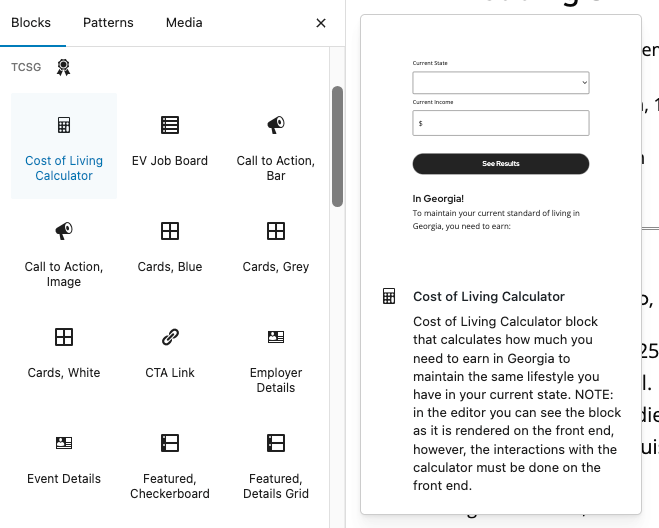
Each block gives you a preview in the inserter so you know exactly what you’re going to get, and help text is included in-line so nothing surprises you.
So no, your team doesn’t hate WordPress. Your staff hate feeling lost and powerless when updating your university’s website. The good news is that it doesn't have to be that way. By choosing a lightweight, block-first approach, you can have a site that is not only beautiful and fast on the front end, but also a genuine joy to manage.
Ready to love WordPress again? Give us a shout.