Where Did All My Tokens Go?
Share


There’s a moment in the day that frequent AI users know all too well. You’re a couple hours into a productive session, the model has finally understood the assignment, your next round of revisions is queued up in your head, when a banner pops up saying you’ve just hit your token limit. The flow you were in suddenly stops. You can switch to another tool and start a new chat and explain the context all over again, or you can decide to wait till the limit resets in a few hours. Either way, you’re blocked.
Hitting a usage limit is obviously frustrating. It’s also an opportunity to dive into an important but underappreciated topic. Token limits exist for a reason. They ration something that has a real cost. Understanding what that cost is, where it accumulates, and what we can do about it is becoming an important part of being a thoughtful AI practitioner.
What Is a Token?
A token is the unit of currency in how language models read and write. Roughly, one token is a chunk of text smaller than a word and larger than a letter. The word “tokenization” might be three or four tokens; common short words are one token; a long URL might be a dozen. Every prompt you send is broken up into tokens before the model sees it, and every response is generated token by token. When the platform says you’ve used 200,000 tokens, it means the model has processed that much language to get you where you are.
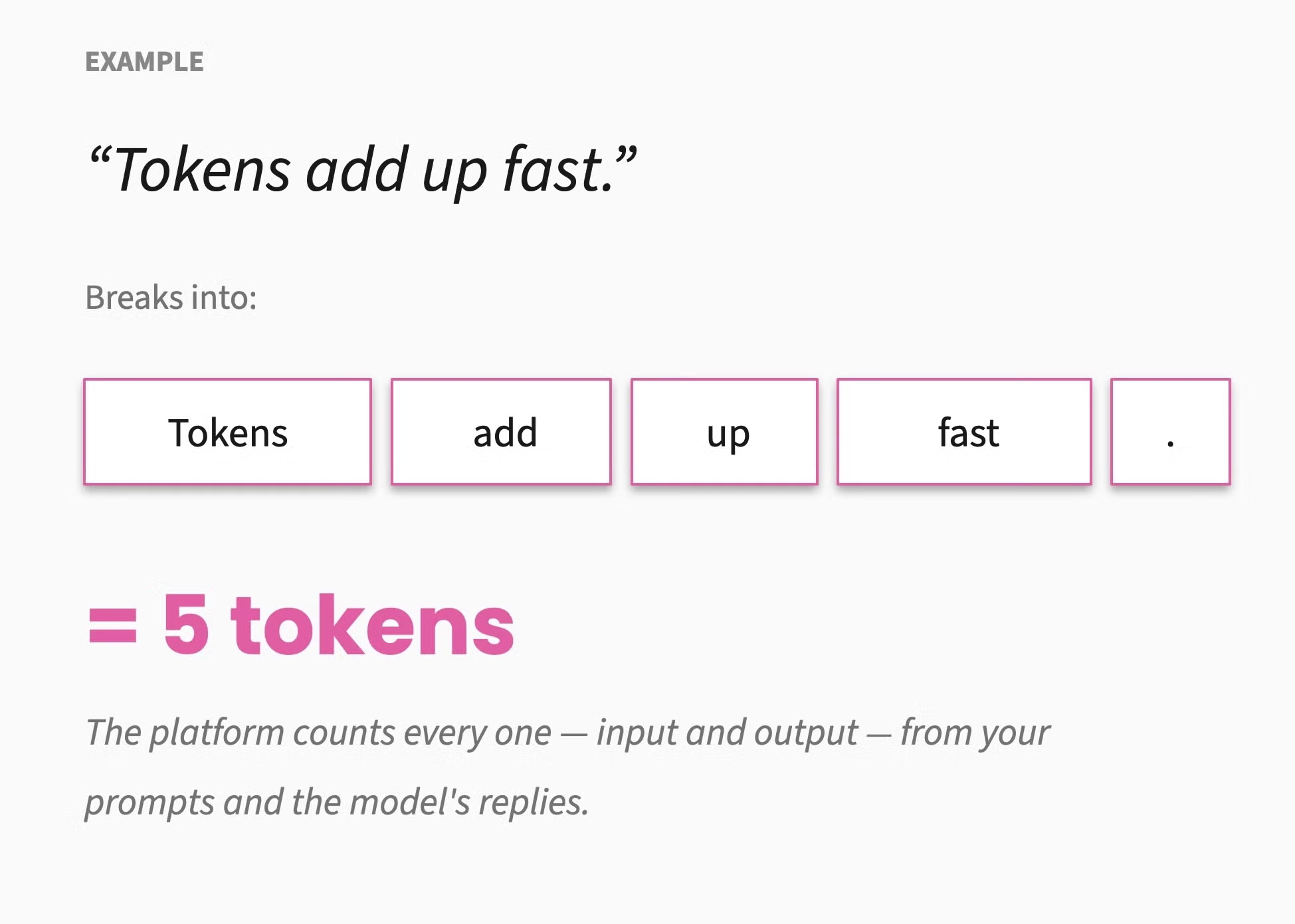
Platforms ration tokens because each one represents a unit of compute on their end. That compute draws power. That power costs money. Servers running models also produce heat, which means cooling, which (depending on the facility) means water. None of this is hypothetical. The issue then becomes how big the costs are, who pays them, and what practitioners can do to keep them in check.
The Three Costs of a Token
A token costs three things, and they don’t always line up.
1. It costs the platform: Compute costs real money. Anthropic, OpenAI, Google, and others pay for the GPUs and data centers that serve every query. The token limits you hit are partially a rationing mechanism for that cost, set high enough that most users don't notice and low enough to keep the business viable.
2. It costs your organization: If you’re on a paid plan, your seats have token allocations. If you’re on the API, you pay per token. Either way, the more tokens your team consumes, the more your company spends. For agencies like ours, this shows up as a line item in operating expenses and a constraint on what we can offer clients.
3. It costs the environment: This is the trickiest one. Per-token energy use is real but small. However, when aggregated across billions of queries it adds up to something measurable. Google has disclosed that a median Gemini text query consumes about 0.24 watt-hours of electricity and 0.26 milliliters of water, with around 0.03 grams of CO₂ equivalent in emissions. That’s roughly nine seconds of television per prompt, or five drops of water. Multiplied by the more than 750 million people using Gemini monthly, the numbers start feeling more impactful.
Two important caveats for transparency: First, Anthropic (which makes Claude, the platform we use at Kalamuna) has not published equivalent per-query figures. Third-party estimates exist, but they’re only estimates, and we have to treat them that way. Second, even where figures are disclosed, they don’t include training, image and video generation, agentic coding sessions, or long-context reasoning, all of which can be substantially more energy-intensive. Google has also shown that per-query efficiency improved roughly 33× in a single year, which means yesterday’s number is not today’s number.
So while the environmental cost of any single query is small, the aggregate cost across an industry that’s still scaling significantly every quarter is significant.
Where Tokens Accumulate
Most people hit their token limits because modern AI work hides token costs in places that aren’t obvious from the chat window. Knowing where those hiding places are is the key to knowing what changes to make in your day-to-day tool usage.
File uploads aren’t all the same
A plain text or markdown file is just text in the model’s context. A PDF is more expensive than people realize: Claude processes every page twice, extracting the text and converting the page into an image, then reading both together. Anthropic’s own documentation puts the cost at roughly 1,500 to 3,000 tokens per page for the text plus a comparable image-vision cost per page. A 20-page PDF can consume 50,000 to 90,000 tokens before the conversation begins. DOCX is handled differently (parsed as structured text plus formatting metadata, with no rasterization), so it’s cheaper per page than PDF but still carries overhead compared to plain markdown. If format is a choice, go for plain text or markdown. If you’re working with PDFs, know that you’re paying for the image reading as well as the text.
Connectors compound the cost in two ways
First, when you enable a connector (Google Drive, Confluence, Jira, Figma, and so on) at the account, project, or chat level, the connector’s tool definitions (names, descriptions, parameter schemas) load into the conversation context at startup, before you type anything into the prompt field. Each connector can use up a few thousand tokens. Ten enabled connectors can mean 30,000 to 50,000 tokens of context spent on tool definitions you may not use in that conversation. Second, every actual retrieval pulls results into the conversation, where they count as context for every subsequent turn. Connectors are often what makes AI useful for real work, so the practical move is to enable only the ones you reasonably expect to use, and to take advantage of the “Load tools when needed” option (in Claude’s settings under “Capabilities”) as that defers schema loading until the assistant actually looks for a tool.
Web search and Research are expensive features
When web search is enabled at the chat level, its tool definitions load into context for every message in the session, whether you search anything or not. When you do, each search dumps roughly ten result snippets into the conversation, and those snippets accumulate. A full page fetch can land 5,000 to 20,000 tokens depending on the page. Research mode takes this even further. It operates agentically, running many searches and fetches in sequence to compile a report, sometimes over the course of 30 to 45 minutes. Research mode draws from the same usage allocation as ordinary chats, only much more heavily. Anthropic’s own guidance is to leave web search and Research off by default, and only turn them on for the conversations that actually need them.
Project setup is sticky in one way, efficient in another
Project instructions load with every conversation in the project. If you write a long instruction set meant to cover every possible scenario, every chat in that project pays for it, including the ones where most of it is irrelevant. Project knowledge files behave differently. Claude retrieves only the chunks relevant to the current question, and the content is cached so it doesn’t re-burn tokens across conversations. The practical advice splits: keep project instructions lean and load-bearing, and treat the project knowledge base as a token-saver for reference material you’d otherwise re-paste across multiple chats.
Skills vs. instructions is an architecture choice
Project instructions load with every conversation. Skills use progressive disclosure: only a skill’s brief description loads at startup, the full skill content loads when a task triggers it, and any supporting files inside the skill folder load only when the model explicitly opens them. A library of 20 skills costs a few hundred tokens of context upfront. The equivalent capability spread across 20 connectors might cost 30,000 to 100,000. Keep general guidance in skills, and reserve project instructions for the things that should genuinely shape every chat.
Conversation length is cumulative
Each turn re-processes everything that came before it. A 50-turn conversation isn’t 50 small token charges; it’s a growing context window where every turn pays for the full history up to that point. Long conversations are sometimes worth it. Most of the time, starting a fresh chat once the current thread has done its work is cheaper, clearer, and more focused.
How Different Choices Add Up
Token Usage Explorer
How to read this. The figures shown are illustrative ranges drawn from public research and vendor disclosures, not exact measurements for any specific account or model. Anthropic, the platform we use most, has not published per-query energy or water figures; the closest public reference is Google's August 2025 disclosure for Gemini (0.24 Wh, 0.26 mL water, 0.03 g CO₂e per median text query). Estimates for Anthropic and OpenAI models come from third-party benchmarking; they vary widely and improve quickly as models become more efficient.
Extrapolation and scaling assumptions. The Compare Models view multiplies per-session ranges by team size and workdays in the chosen period, assuming roughly 10 chat sessions per active user per workday (about 5 workdays per week, 20 per month, 240 per year). The Workflow Breakdown view scales the conversation segment with model choice (Haiku-class baseline, Sonnet-class 1.4×, Opus-class 1.8×) to reflect the tendency of larger models to produce longer responses that then compound across turns. Other workflow components (file processing, tool definitions, retrieval) stay constant across model tiers. Treat the totals as a way to feel the shape of the curve, not a forecast for your organization.
Limitations. These ranges cover text-only chat. Image and video generation, agentic coding sessions, and long-context reasoning can be substantially more energy-intensive. Token counts for workflows are rough and depend heavily on file size, response length, and model behavior. Treat the numbers as orders of magnitude, not precise figures.
The explorer above lets you toggle between model tier and conversation patterns, and break a single workflow down into its token components. The point isn’t to land on a precise number for your team. The point is to see, at a glance, how much variation a few choices create.
The Levers That Matter
Here are five practical tips to manage your token usage, in rough priority order:
- Right-size the model: This is the single biggest lever. A Haiku-class model (aka “Fast” for Gemini, “Instant” for ChatGPT) can handle drafting, summarizing, and structured extraction at a fraction of the cost of an Opus-class model. Reserve the larger models for tasks that genuinely benefit from them: complex reasoning, ambiguous synthesis, work where quality differences are visible. Most teams default to the biggest model out of habit, and that habit is expensive.
- Be deliberate about context: Start fresh chats when the current thread has run its course. Skip pasting an entire document when a relevant excerpt will do. If you’re attaching files, go with markdown or plain text over PDF and DOCX when the choice is available (Google Docs lets you download as .md files). Turn off web search, Research, and connectors when the conversation doesn’t need them, and turn them back on when it does.
- Structure project setups carefully: Keep project instructions lean and load-bearing. The project knowledge base is well-suited for reference material you’d otherwise re-paste across chats, since its retrieval model is cheaper than repeated uploads. Use skills as needed for guidance that’s only relevant to specific tasks.
- Write better prompts: A clear, specific prompt that gets a usable answer in one shot is dramatically cheaper than three rounds of “actually, what I meant was…” Prompt clarity is a mark of professional skill and it’s a new craft to hone.
- Know when not to use AI: Sometimes a quick search, a regex, a calculator, or five minutes of thinking does the job better, and quicker. Reaching for AI by reflex is a habit worth examining.
Intentionality Is the Way
Token efficiency, budget responsibility, environmental footprint, and professional craft are all expressions of the same attitude: being deliberate about what we ask AI to do, and why.
Being deliberate makes us better at the work. Better answers come faster, at lower cost, with a smaller environmental footprint as one of the many benefits. Treating that footprint as the only reason to be intentional would overstate what individual choices can do; ignoring it entirely would undervalue what consistent, organization-wide habits add up to.
Hitting your token limit is annoying, but it’s also a useful signal that something in your workflow might have room for improvement. The teams that get the most out of AI are the ones using it intentionally and efficiently.
Further Reading
The resources below informed this post and are worth visiting directly for the full picture.
Anthropic’s documentation
- PDF support — how Claude processes PDFs, including the dual text-plus-vision pipeline and the 1,500 to 3,000 tokens per page figure.
- Web search tool — technical details on the web search tool, including the newer version that supports dynamic filtering of results before they enter context.
- Pricing — current per-token rates across the model family, plus tool pricing (including the $10 per 1,000 web searches on the API).
- Using Research — how the Research feature works, including the requirement that web search be enabled and the way Research chains many searches together.
- How usage and length limits work — the difference between usage limits (across all your chats) and length limits (within a single conversation), and how automatic context management behaves.
- Usage limit best practices — Anthropic’s recommendations on managing your allocation, including the advice to disable web search, Research, and connectors when not needed.
- Advanced tool use — Anthropic’s engineering team on Tool Search and the progressive-disclosure pattern that defers MCP tool loading until needed.
Google’s environmental disclosure
- Measuring the environmental impact of AI inference — the August 2025 Google Cloud blog post that reported the 0.24 Wh, 0.26 mL water, and 0.03 g CO₂e figures for a median Gemini text prompt.
- Measuring the environmental impact of delivering AI at Google Scale — the underlying technical paper with full methodology.
- Our approach to energy innovation and AI’s environmental footprint — Google’s sustainability framing of the same data, including the 33× and 44× year-over-year improvements.
Practitioner perspectives
- Why You Keep Hitting Claude’s Usage Limits — a thorough field guide to where token allocations actually go, including the peak vs. off-peak usage detail.
- 98% of Your Claude Usage Limit Is Going to Conversation History — a practitioner’s measurement of how cumulative context dominates long sessions, with the 8,000-token web search overhead detail.
- How to Stop Hitting Claude Usage Limits — Ruben Hassid’s round-up of practical tips, including the project knowledge base retrieval behavior on paid plans.

Crispin Bailey
Crispin leads Kalamuna's AI practice and governance, helping the agency and our clients adopt AI in ways that are genuinely useful, responsible, and grounded in real human needs. He also directs our design and UX practice — and he treats these as one job, not two: making sure the things we build, and the tools we use to build them, serve the people on the both sides of the screen. Across project phases, he connects research, design, and strategy, with particular care for accessibility.